
There are two types of resets in TomaGrade:
Instructions for performing a single notebook reset
1. Go to the main screen.
2. Mark the required notebook in the check box.
3. In the "More" menu, select "Reset exam" - be careful not to select "Reset course" an action that will reset all the notebooks in the course.
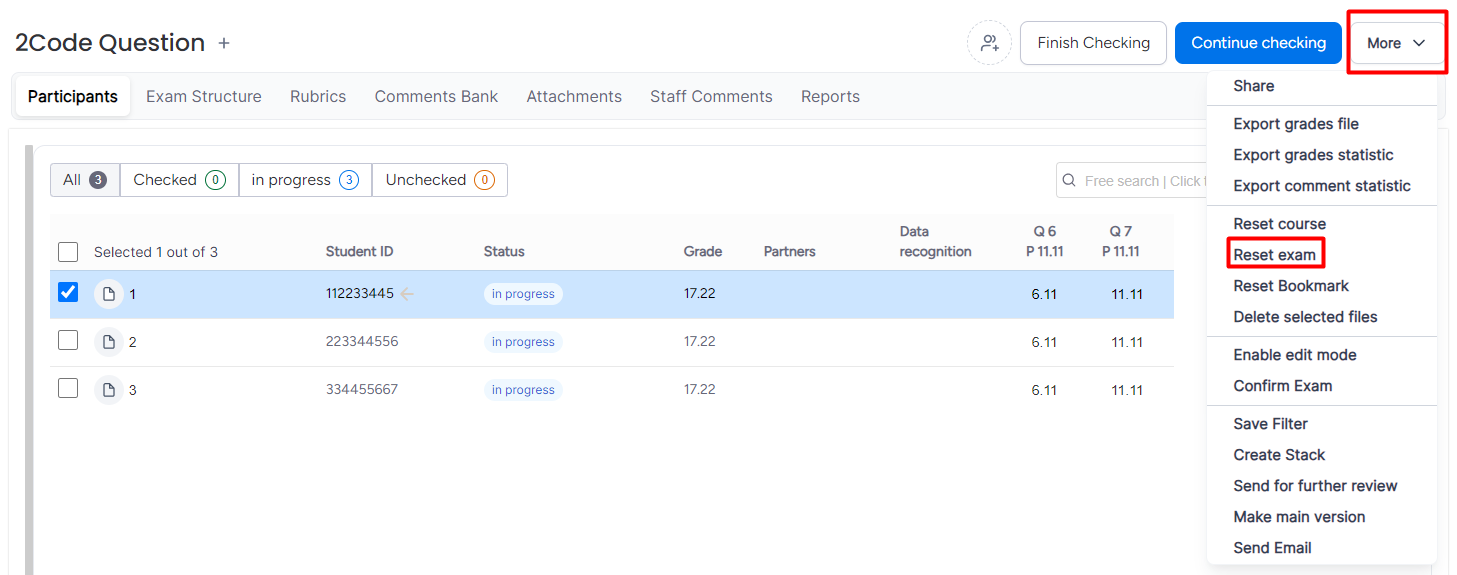
You should remove the check mark (If there is still any left) from the notebook after completing the operation - leaving the check mark will focus the test only on the selected notebook, and after finishing the test you will not be automatically transferred to the next notebook.
Instructions for performing a course reset
Please note that resetting a course will reset all grades, notes and annotations in all exam notebooks. For online and mixed exams with closed questions, it is not recommended to perform a reset.In printed exams, the exam structure will also be reset.
1. Go to the main screen.
2. In the "More" menu, choose "Reset course"
3. Confirm the action.